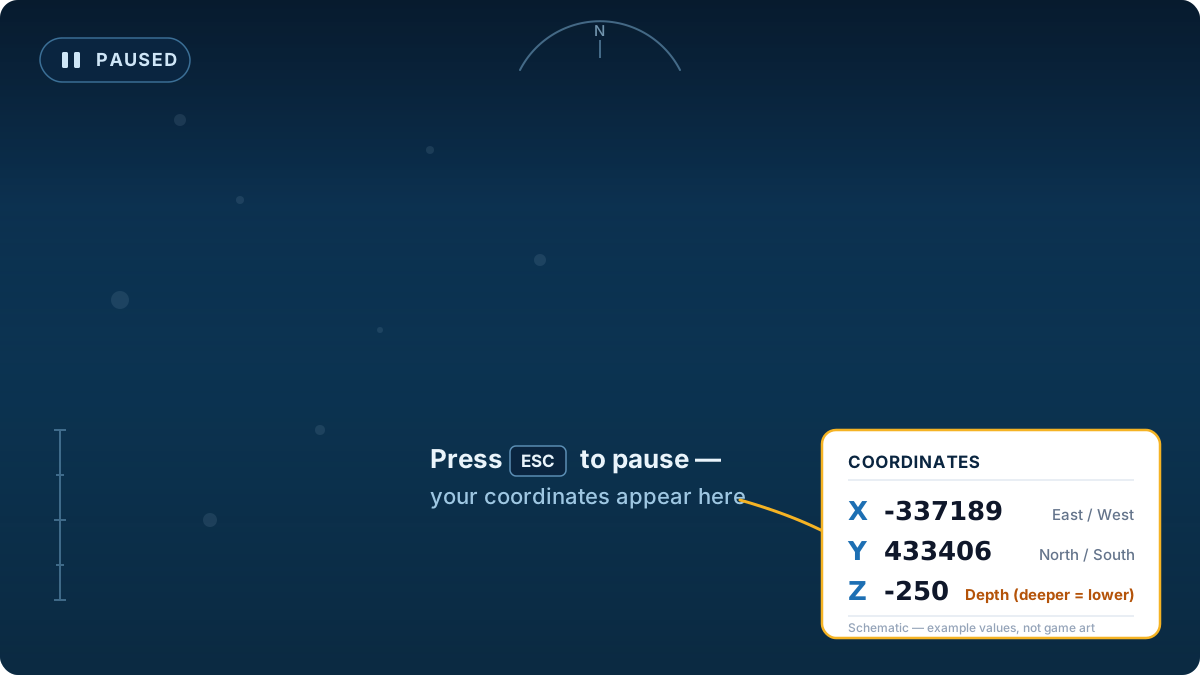
Coordinates
How to See Coordinates in Subnautica 2
Pause the game (press ESC) and look at the bottom-right corner of the
screen. Your current position shows there as three numbers — X, Y and Z.
That's it. Below: what each number means, and a calculator that turns
them into a distance and bearing to anywhere on the map.
Quick answer
ESC → bottom-right corner → three numbers (X, Y, Z). X is east/west,
Y is north/south, Z is depth (more negative = deeper).
What each coordinate means
X — east / west
Bigger (more positive) = further east, more negative = further west.
Y — north / south
In Subnautica 2 the second value tracks your north/south position.
Z — depth
0 is sea level; the more negative it gets, the deeper you are.
Not sure which number is depth?
Easiest check: swim up or down and watch the numbers. The one that
changes as you dive is your depth — it gets more negative the deeper
you go, and sits near 0 at the surface. The other two only change when
you move horizontally.
Turn your coordinates into a route
The calculator below is set to read raw pause-menu numbers. Type your X / Y / Z as your current position, enter where you want to go, and you get horizontal distance, compass bearing, and depth change. (Already using this site's map coordinates instead? Switch the mode to "Map coordinates".)
Can't see your coordinates? Common fixes
- Make sure you actually paused. Coordinates only show
on the pause screen (ESC), not during normal play.
- On a controller / Xbox, open the pause menu with the
Menu/Start button — the coordinates sit in the same bottom-right
corner.
- Want coordinates without pausing? Press F1 to open
the developer debug overlay and read the "Camera World Pos" line (X,
depth, Z). It's less tidy but updates live as you swim.
- Numbers look huge? That's normal — the raw HUD uses
large engine values (like -337189). Paste them straight into the calculator above — it's already set to "Raw pause-menu HUD" mode and converts them to metres from the Lifepod for you.
FAQ
How do you check coordinates in Subnautica 2?
Pause with ESC and read the three numbers in the bottom-right corner. That is the only built-in way to check your exact coordinates; there is no always-on coordinate readout unless you open the F1 developer overlay.
How do I pull up coordinates in Subnautica 2?
There is no separate hotkey — coordinates appear automatically on the pause screen. Press ESC and look bottom-right. If you want a live readout while swimming, the F1 debug overlay shows your position under "Camera World Pos".
How do I use coordinates once I have them?
Coordinates let you measure and follow routes. Type your current X/Y/Z and a target into the calculator on this page to get distance, bearing and depth change, or use the homepage Navigator to find the nearest resource from where you are.
Does Subnautica 2 have a map?
Not a traditional in-game map. Coordinates plus a compass are the main navigation tools, which is why a coordinate calculator is useful for planning routes.